



























Choosing a server rack is a physical infrastructure decision with consequences that outlast almost every other IT purchase you will make this year. A rack selected without accounting for unit height, depth, weight distribution, and environmental rating creates problems that surface months or years later: equipment that will not fit, doors that will not close, floors that were never rated for the load, or a cabinet that fails during a seismic event it was never built to withstand. This guide covers the technical fundamentals you need before you buy, and explains how to get current availability and lead times when your project is on a deadline.
Rack Unit Sizing and the Math Behind U Height

A rack unit, abbreviated U, is a standardized measurement equal to 1.75 inches (44.45 mm) of vertical mounting space. Every piece of rack mounted equipment is measured in U increments, so a 1U server occupies 1.75 inches, a 2U server occupies 3.5 inches, and so on. Racks themselves are sold by total U capacity, most commonly in 42U, 45U, and 48U configurations, though custom heights are available for constrained ceiling clearances or unusually tall deployments.
The calculation for required rack height is straightforward in principle but frequently miscalculated in practice. Add up the U height of every piece of equipment you plan to install, then add headroom for cable management panels, PDU mounting space, and future expansion. A common mistake is sizing a rack to exactly match current equipment with no reserve capacity, which forces a second rack purchase within twelve to eighteen months as the environment grows. A second common mistake is failing to account for the vertical space consumed by horizontal cable managers, which are frequently required between switches and patch panels and can add two to four U of consumed height that never shows up in an initial equipment list.
Ceiling height matters as much as U count. A 45U rack requires roughly 84 inches of clearance including the top cap and any overhead cable tray connections. Always measure the installation space before ordering.
Depth and Clearance
Server rack depth is defined by the distance between the front and rear mounting rails, and it must accommodate the longest equipment you intend to install plus clearance for cable bend radius and rear door closure. Standard depths run from 600mm for network closets with switches and patch panels to 1000mm or 1200mm for deep servers with redundant power supplies and cable management arms.
Depth mistakes are among the most common and most expensive rack buying errors. A server that is two inches too long for the rack's internal depth will not seat properly against the rear rail, will not allow cable management arms to articulate, and in enclosed cabinets will prevent the rear door from closing at all. Before ordering, measure the depth of your longest planned server or storage array including any rear mounted cable management hardware, then confirm the rack's internal usable depth, not its external cabinet depth, meets that requirement with at least two to three inches of margin.
Front and rear clearance outside the cabinet also matters for serviceability. Most equipment manufacturers specify a minimum service clearance, typically 36 inches, for pulling rack mounted servers or accessing rear cabling without disconnecting the entire rack.
Weight Capacity and Load Ratings
Every rack carries a static and dynamic load rating, and the two numbers are not interchangeable. Static load rating describes how much weight the rack can support once fully loaded and stationary. Dynamic or rolling load rating, relevant for racks equipped with casters, describes how much weight the rack can safely support while being moved. A rack rated for 2,000 pounds static may carry a significantly lower rolling rating, and moving a fully loaded rack that exceeds its dynamic rating risks frame damage or tip-over.
Calculating required capacity means summing the weight of every server, storage array, UPS, and battery unit planned for the rack, not just the equipment installed on day one. Battery backup units in particular are often underestimated. A single rack mounted UPS with extended battery modules can weigh several hundred pounds on its own, and stacking multiple battery frames in the bottom of a rack for center of gravity reasons is standard practice precisely because that weight needs to sit low.
Floor loading is a separate calculation from rack capacity. A fully loaded 42U cabinet can weigh over 2,000 pounds concentrated on a footprint of roughly six square feet. Raised floor tiles and standard slab construction have their own point load limits, and a facilities engineer should confirm the floor can support the combined weight of the rack, its contents, and any adjacent racks before installation, particularly on upper floors or raised access flooring systems.
Server Rack Types and When Each Applies

Open frame server racks, sometimes called 4-post, 2-post or relay racks, expose equipment on all sides with no enclosing panels or doors. They cost less, allow maximum airflow, and simplify cabling access, which makes them well suited to network closets and telecom environments where physical security is handled by the room itself rather than the rack. Four-post open frame racks add front and rear vertical rails for deeper equipment and higher load capacity while retaining open access.
Enclosed server cabinets add side panels, a locking front door, and a locking rear door, providing physical security and airflow containment in shared or less controlled spaces. The tradeoff is reduced passive airflow and the need for active ventilation, whether through fan panels or hot aisle and cold aisle containment, particularly as equipment density increases.
See our Air Conditioned Server Racks and our Soundproof Server Rack options.
Read more about Server Cooling in Keep IT Cool - Air Conditioned Cabinets and Cooling Servers.
Wall mount server racks solve for a different constraint entirely: floor space. Rather than sizing a rack for height capacity, wall mount racks size for a small footprint of equipment, typically under 20U, in locations where floor space is unavailable or a full-size cabinet is unnecessary for the equipment load, such as branch offices or small network closets.
Portable server racks serve deployments that are not permanent, including field installations, temporary event infrastructure, and edge computing sites where a small number of servers or network devices need enclosure without a full data center buildout. Casters, compact footprints, and lighter frames make them easy to relocate, but confirm the rolling load rating against your loaded equipment weight before moving a populated rack.
Small server racks for desktops at home fit home labs, home offices, and small networks where a few pieces of gear, such as a switch, a NAS, a small server, and a UPS, need to be organized in a compact footprint on a desk or against a wall. At this scale the deciding factors are usually the depth of your longest device, ventilation around equipment that may run continuously in a living space, and fan noise, so measure your equipment and plan for airflow before choosing a height.
Seismic and NEBS Zone 4 rated server racks are engineered and tested to a specific structural standard for earthquake resistance, most commonly Telcordia GR-63-CORE, and are required in seismically active regions for telecom and carrier grade installations. These racks use reinforced welds, wider footprints, and specific anchoring hardware that standard commercial racks do not include, and substituting a standard rack in a facility that requires seismic certification is a compliance failure, not a cost saving.
NEMA rated server enclosures address environmental exposure rather than seismic risk. A NEMA 12 rated cabinet protects against dust and dripping non corrosive liquids in indoor industrial settings, while NEMA 4X rated stainless steel or non metallic enclosures protect against corrosion, washdown, and outdoor exposure. Selecting the correct NEMA rating depends entirely on the installation environment, and using an indoor rated cabinet in an outdoor or industrial location will lead to premature equipment failure from moisture and particulate intrusion.
Mounting Hardware and Rail Kits
Rack mounting is not universal across manufacturers despite the shared U measurement standard. Square hole, round hole, and threaded rail patterns each require specific cage nuts, clip nuts, or direct threading, and rail kits designed for one server manufacturer frequently will not fit another without an adapter bracket. Before ordering equipment for an existing rack, confirm the rail pattern matches, and keep a stock of the correct cage nuts and mounting screws on hand, since 10-32 and 12-24 threading are both common and not interchangeable.
Read more about Server Rack hardware in Control IT: Server Rack Screws and Accessories.
Common Buying Mistakes
The most frequent rack buying error is sizing for current equipment with no expansion margin, which is compounded by underestimating the vertical space consumed by cable management. The second most frequent error is depth mismatch, ordering a rack based on external dimensions rather than confirmed internal usable depth against the longest planned equipment. The third is treating static load rating as sufficient without checking floor load capacity, particularly in facilities with raised flooring or upper level installations. The fourth is assuming a specified rack is in stock and ready to ship, when availability and lead times vary by model, configuration, and current demand, and can derail a project schedule if they are not confirmed before a deadline is committed. Finally, buyers in regulated or high compliance environments sometimes default to a standard commercial rack when the installation actually requires seismic, NEBS, or NEMA certification, a decision that creates compliance exposure rather than cost savings.
Time-Sensitive Orders
Confirm Availability and Lead Times
Product pages and specifications tell you what a rack can do, but they cannot tell you what is available to ship today. Inventory levels, production schedules for custom and seismic configurations, and freight timing all change, and a rack that fits your specification perfectly is only useful if it arrives before your installation window closes. When your order is time-sensitive, the most reliable path is to email or call us and be connected directly with one of our account managers, who can confirm current availability and realistic lead times before you commit to a schedule.
To reach an account manager, email sales@rackmountsolutions.net or call toll free at 1.800.352.6631. Include your rack type, quantity, and the date you need equipment on site, and we can respond with accurate availability and timing, along with any alternatives if your first choice will not arrive in time.
Server Rack FAQs
These questions come up often with server rack buyers. For a quick spec or a fast answer, use Ask Us a Question on any product page. For current availability and lead times on time-sensitive orders, email or call us to be connected with an account manager.
How many amps does my server rack actually need?
Add up the nameplate amperage of every piece of equipment planned for the rack, then apply the 80 percent continuous load rule that most electrical codes require, meaning a 20 amp circuit should carry no more than 16 amps of continuous IT load. Most single server racks land somewhere between one 20 amp circuit and two 30 amp circuits depending on server count and redundancy needs, but nameplate ratings are worst case figures and rarely reflect real draw, so measuring actual draw with a PDU that reports current is the only way to know for certain. If the math gets complicated with mixed voltage equipment or N+1 redundancy, ask a quick question from any product page, or email us to be connected with an account manager who can review the load calculation with you before you order.
What is the difference between a 42U and a 45U rack, and which should I buy?
The three extra U on a 45U rack add roughly 5.25 inches of height, which sounds minor until you are trying to fit one more switch or a horizontal cable manager that a 42U configuration cannot accommodate. 42U remains the most common size because it matches standard shipping container and doorway constraints, while 45U is popular specifically because it buys extra room without requiring a nonstandard footprint. Availability can differ between the two heights, so if your install date is fixed, email or call us to confirm which size is available to ship in your timeframe.
Do I need liquid cooling yet, or is air cooling still enough for my rack?
Air cooling with proper hot aisle and cold aisle containment remains effective up to roughly 15 to 20kW per rack, and can be pushed further with in-row cooling in well designed rooms. Above that range, and especially past 30kW, air alone struggles to remove heat fast enough regardless of airflow management, which is where direct-to-chip or rear door heat exchanger liquid cooling becomes necessary rather than optional. Most enterprise racks today still sit well under that threshold, so the honest answer for the majority of buyers is that air cooling with good containment is still enough. If you are planning a higher density deployment, email or call us to be connected with an account manager who can help match your density to the right rack and confirm what is available.
How much weight can my server rack actually hold before the floor becomes the problem?
A fully loaded 42U cabinet, including a rack mounted UPS with battery packs, commonly reaches 1,500 to 2,000 pounds concentrated on a footprint of roughly six square feet, which many raised floor systems and even some slab installations were never designed to support at that concentration. Static load rating on the rack itself is only half the equation; the other half is a facilities engineer confirming the floor's point load capacity, particularly on upper floors, raised access flooring, or anywhere multiple loaded racks sit close together. For a quick check on a specific model's load rating, use Ask Us a Question on its product page.
What is the difference between an open frame rack and an enclosed server rack?
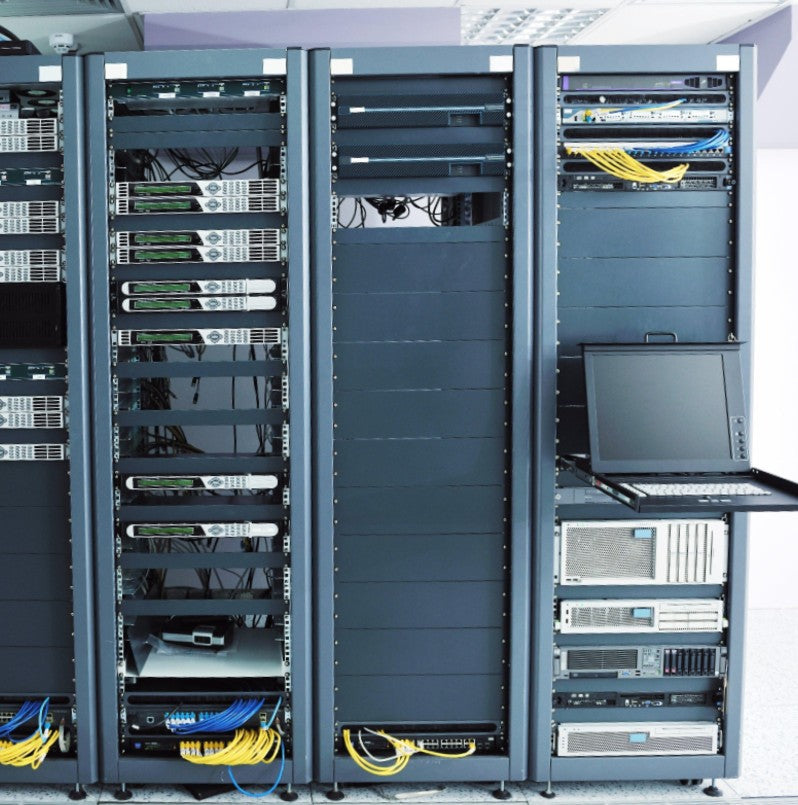
An open frame rack, also called a 2-post or 4-post relay rack, exposes equipment on all sides for maximum airflow and easy cabling access, while an enclosed cabinet adds side panels and locking front and rear doors for physical security and airflow containment. The right choice depends entirely on whether the room itself provides physical security. Network closets and telecom rooms with controlled access often use open frame racks, while shared offices, colocation floors, and any space without dedicated access control call for an enclosed cabinet. Browse server racks to compare both styles side by side, and use Ask Us a Question on any product page for a quick spec answer.
How many decibels can a soundproof server rack actually remove?

Soundproof server racks in our lineup remove anywhere from about 15 dB(A) up to 31 dB(A) depending on the model, with the reduction achieved through acoustic foam paneling and quiet fan systems engineered to still dissipate the equipment's heat load rather than trap it. A 31 dB(A) reduction is roughly the difference between a loud vacuum cleaner and a quiet conversation, which is significant in a shared office or classroom setting. Browse soundproof server racks to see dB and heat dissipation specs by model. Need one on a deadline? Email or call us to be connected with an account manager who can confirm availability and lead times.
When do I need an air conditioned cabinet instead of just better airflow management?
Airflow management and containment solve heat problems when the surrounding room air is already at an acceptable temperature and reasonably clean. An air conditioned cabinet becomes necessary when the ambient environment itself is the problem, meaning a warehouse, manufacturing floor, or outdoor enclosure where room temperature and air quality cannot be controlled and dust or debris would otherwise reach the equipment. Browse air conditioned server racks to see BTU ranges and NEMA 12 configurations. To size a unit against your space's ambient conditions and confirm current availability, email or call us to be connected with an account manager.
What does NEBS Zone 4 seismic certification actually require?
NEBS Zone 4 certification means a rack has been tested to Telcordia GR-63-CORE standards for the most severe earthquake zone classification, which requires reinforced welds, a wider structural footprint, and specific anchoring hardware that standard commercial racks are not built with. This is a compliance requirement, not a nice-to-have, for telecom and carrier grade installations in seismically active regions, and substituting a standard rack exposes the installation to both equipment damage and compliance failure. Browse NEBS seismic server racks to see certified models and available reinforcement kits. Because seismic configurations can carry longer lead times, email or call us early to be connected with an account manager who can confirm timing for your project.
What is the difference between NEMA 12 and NEMA 4X for a server cabinet?
NEMA 12 rated cabinets protect against dust and dripping non corrosive liquids and are built for indoor industrial environments like manufacturing floors and warehouses. NEMA 4X rated enclosures, typically stainless steel, aluminum, or non metallic construction, add protection against corrosion and washdown and are rated for outdoor exposure. Choosing between them comes down entirely to whether the installation is indoor-industrial or outdoor-exposed, and using the wrong rating in the wrong environment leads to premature equipment failure from moisture or particulate intrusion. Browse NEMA rated server racks to compare NEMA 12 and NEMA 4X models, and use Ask Us a Question on any product page for a quick answer on ratings.
When does a wall mount rack make more sense than a floor standing cabinet?
Wall mount racks solve for floor space rather than height capacity, and make sense whenever the equipment list is small, typically under 20U, and floor space is limited or unavailable, such as branch offices, retail back rooms, or small network closets. Swinging or hinged wall mount models add rear access for cabling and maintenance without needing to pull the whole unit off the wall, while fixed models are the most economical option when rear access is rarely needed. Browse wall mount server racks to compare fixed, swinging, and NEMA rated options. For a multi-site rollout or a fixed install date, email or call us to be connected with an account manager who can confirm quantities and lead times.
Can a portable server rack handle permanent equipment, or is it just for temporary setups?

Portable and compact racks are built for mobility, not fragility, and many models are rated to hold thousands of pounds of permanent equipment despite their smaller footprint. The real question is not whether the rack can handle permanent gear but whether the deployment itself is permanent; field installations, edge computing sites, and small office setups often use portable racks as their permanent solution simply because a full-size cabinet is unnecessary for the equipment load. Browse portable and compact server racks to see weight capacities by model, and use Ask Us a Question on any product page for a quick spec check.
What is the difference between a 2-post relay rack and a 4-post server rack?
A 2-post relay or telco rack supports equipment along a single front mounting plane and is typically used for lighter network gear like patch panels and switches, while a 4-post server rack adds a rear mounting plane that supports the weight and depth of full servers and storage arrays. Telecom environments favor 2-post racks for their lower cost and easier cabling access, while data centers running actual servers almost always need the added depth support of a 4-post design. Browse 2-post, telco, and relay racks to compare load ratings and mounting styles. Ordering in volume for a telecom buildout? Email or call us to be connected with an account manager who can confirm current availability.
What actually comes with a budget rack, and where do the savings come from?
Budget rack lines like Rack Basics keep costs down through simpler assembly and more straightforward designs rather than by cutting structural corners, so buyers still get sturdy, reliable mounting hardware without paying for features like advanced cable routing or premium finishes they may not need. The savings show up in fewer configuration options and simpler included accessories, not in load capacity or build quality. Browse Rack Basics to see what is included at each price point, and use Ask Us a Question on any product page for quick answers on what ships with each model.
Talk to an Account Manager
Rackmount Solutions has spent over 20 years answering exactly these questions for data center, telecom, and industrial customers building out infrastructure from a single cabinet to a full facility. Our team includes data center professionals who can size a rack against your real equipment list, your floor plan, and your compliance requirements before you order, not after. Ask Us a Question on any product page works well for quick questions that need quick answers. For up-to-date availability and lead times on time-sensitive orders, the best path is to email sales@rackmountsolutions.net or call 1.800.352.6631 to be connected with one of our account managers, who will give you an accurate answer the first time.


